

Data Flow
Module Objectives
By the end of this module, you should be able to:
- Describe the data flow from a User machine to Panzura nodes
- Understand what processes a file undergoes when it hits the Panzura node
- Describe the data flow from the Panzura Node-to-Cloud
- Understand how Drive Files are created
PANZURA
Performance Optimizations
Panzura CloudFS
The Panzura node optimizes performance with a series of technologies:
- Metadata and Data Separation
- Compression
- Dedupe
- Block-based deduplication
- SHA256 checksums used to identify duplicate blocks
- Multi-level Snapshots
- Tiered Caching
Metadata and Data Separation
Separated on disk
- Metadata is never evicted
- Data can be evicted
- Reduces fragmentation
Separated in Cloud
- Allows metadata to be downloaded and applied without downloading data
- Data is downloaded on request if not available on the local node in cache
- Metadata grouped into metadata objects
- meta-1035-1-24680.snp
- master-meta-1035-1-24680-31.snp
- Data blocks grouped into drive-files (data objects), 4MB default size
- data-1035-1-24680-12.snp
PANZURA
Compression, Dedupe, Drive-files, & Snapshots
Overview: Data Flow
- First stored on local disk
- The file is then split up into: O A metadata file O Multiple data drive files
- Max size of 32MB for Single-Site, 4MB for Multi-Site
- Package the data drive files into cloud storage objects and uploads to the cloud (protocol is cloud vendor specific)
- Periodic snapshots of the file system (system and user).
O Incremental changes are replicated and applied to remote nodes
- Metadata replication happens first-so file changes are visible on remote filers very quickly.
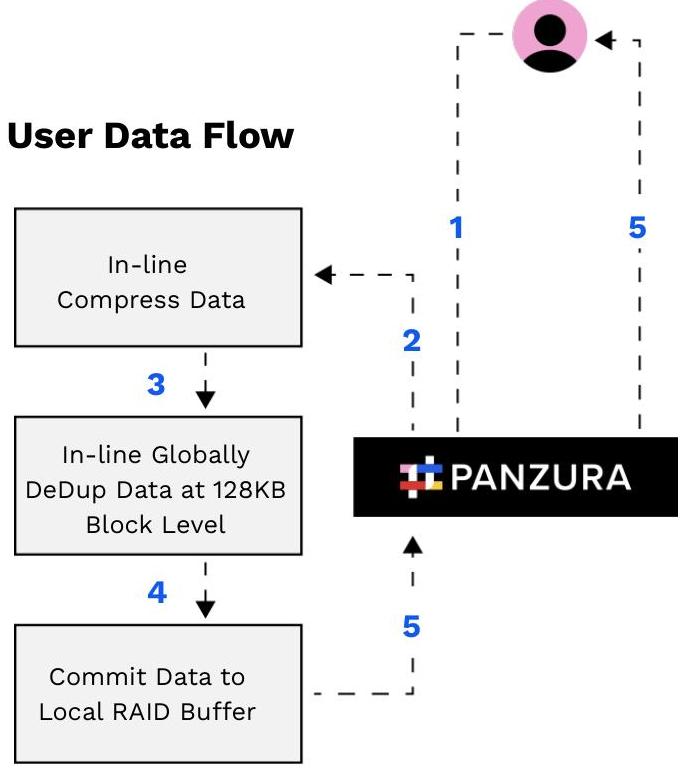
Overview: User-to-Node Data Flow
User-to-Node Data Flow (File):
- Write Data
- Compress
- Deduplicate
- Commit to Storage
- Acknowledge Write
User Data Flow
Files: Ingestion
- User writes file to the Panzura node.
- i.e. File1 in size.
- Upon ingest, files are broken into a collection of blocks.
- The default block size is 128 KB .
- At 448 KB , File1 will require 4 blocks.
- Block1 - 128 KB
- Block2 - 128 KB
- Block3 - 128 KB
- Block4 - 64 KB
- Blocks do not have to be 100% full, Block4 is 128 KB but only contains 64 KB .
- After a file is broken into blocks, all subsequent operations are performed on the blocks themselves independent of the files that use them.
File1
| Block1 | Block2 | Block3 | Block4 |
|---|---|---|---|
| 128 KB | 128 KB | 128 KB | 64 KB |
Blocks: Compression
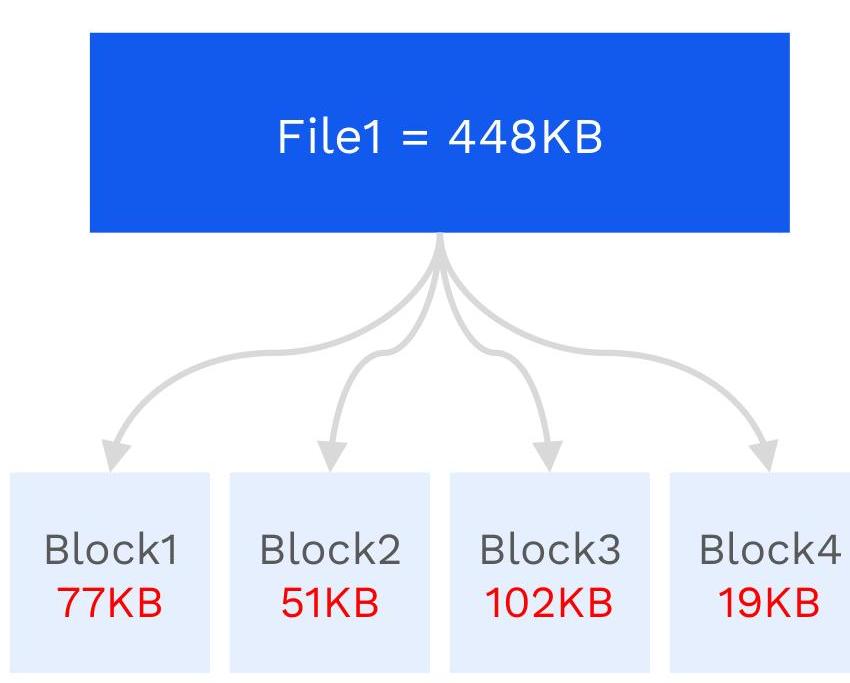
- After being broken into blocks, the individual blocks are compressed.
- Compression happens in-line, in memory, as the blocks are being created.
- Since a block is the smallest container within the local buffer, if a block started full, at the end of compression, a block could be less than 100% full, as little as 0%.
- Each block will compress differently based on its contents.
- Block1 - 128KB to 77KB
- Block2 - 128KB to 51KB
- Block3 - 128KB to 102KB
- Block4 - 64KB to 19KB
Blocks: Deduplication
- Deduplication is the process of identifying and reusing previous blocks that are 100% identical to new blocks.
- After being compressed, the individual blocks are deduplicated, in-line, in memory.
- The deduplication process involves calculating a fingerprint, called the dedup fingerprint, on each block and quickly comparing that dedup fingerprint to the dedup fingerprints of all other blocks.
O Block1 - FPA O Block2 - FPB O Block3 - FPC O Block4 - FPD
File1 = 448KB
Block1 FPA
Block2 FPB
Block3 FPC
Block4 FPD
Blocks: Deduplication
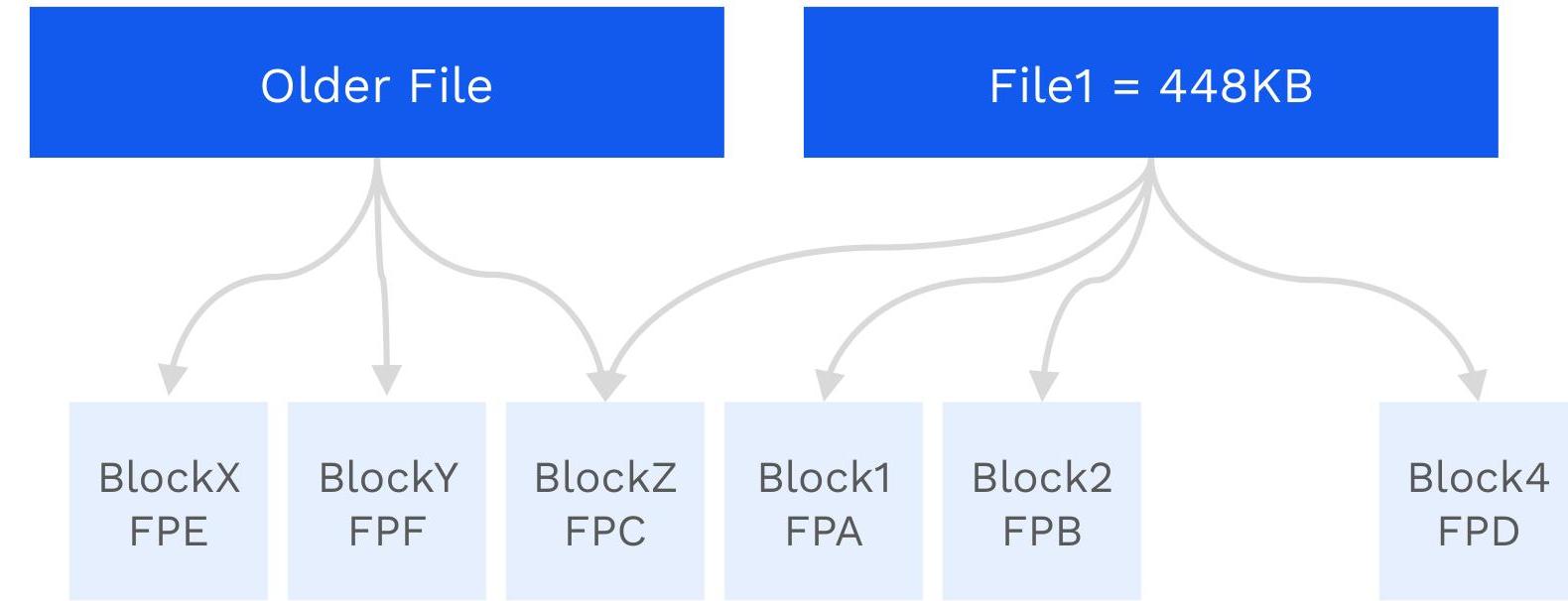
- Older files have blocks.
- The blocks of the older files also all have dedup fingerprints.
CloudFS
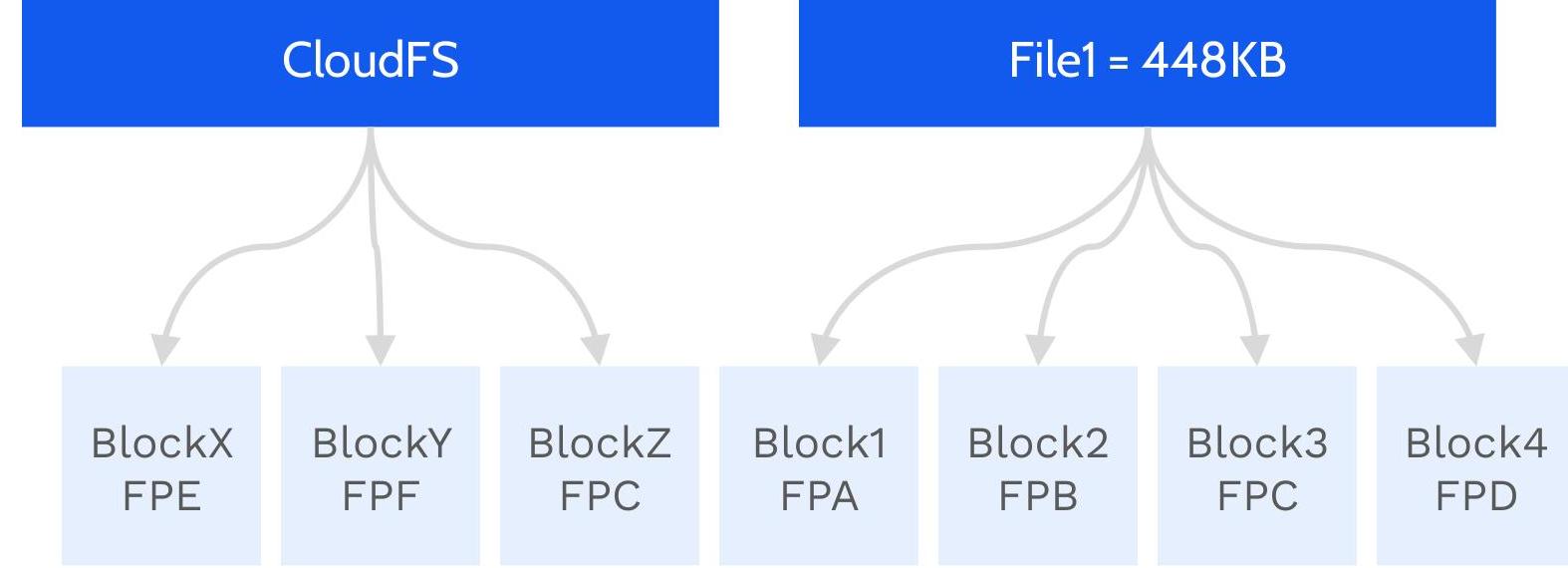
Blocks: Deduplication
- The new dedup fingerprints are compared to older fingerprints.
- If a match is found, the new block is discarded and the block pointer is adjusted to point to the old block.
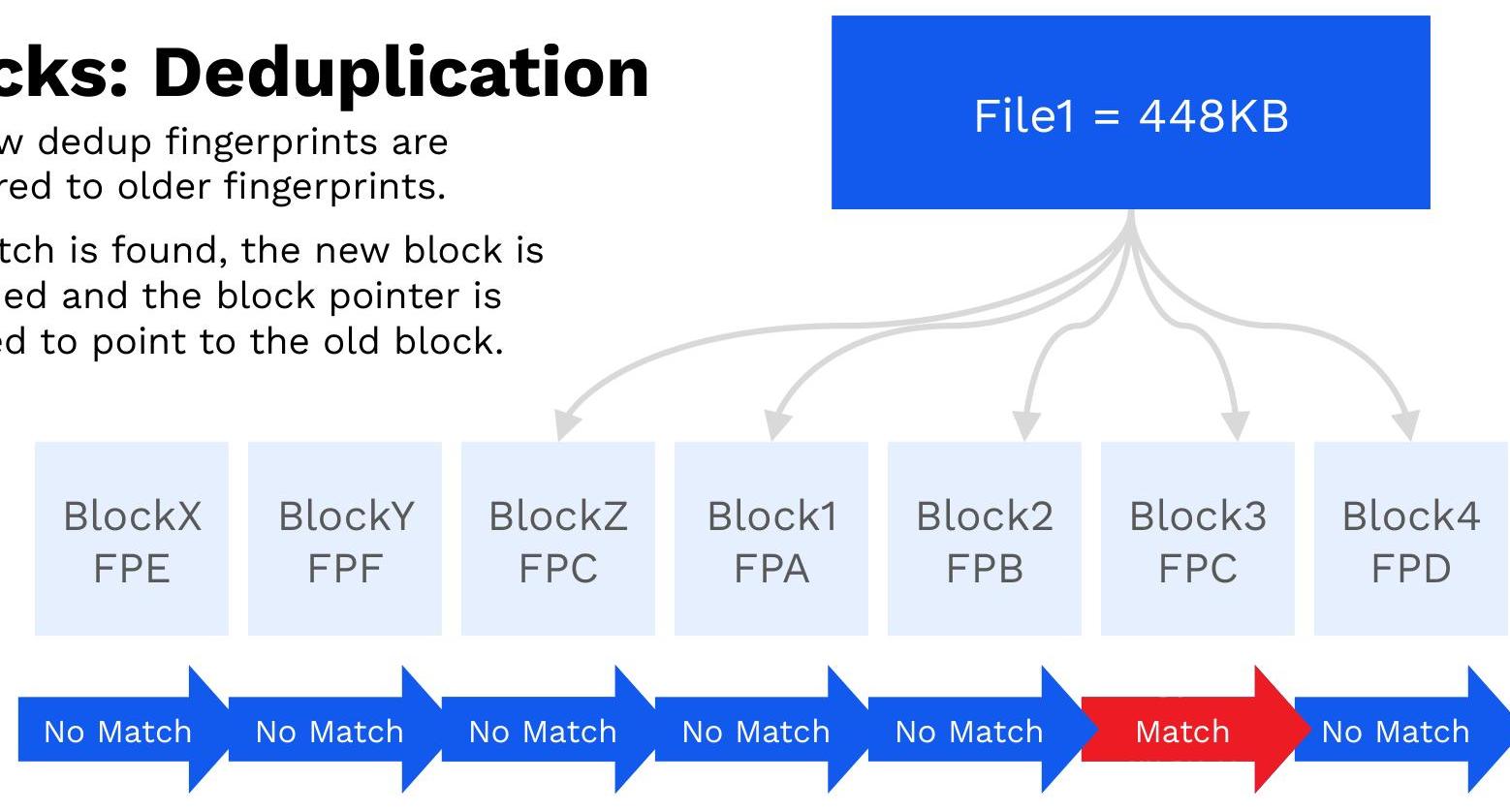

Blocks: Deduplication
- Blocks can be shared between multiple files
Committing Data to Buffer
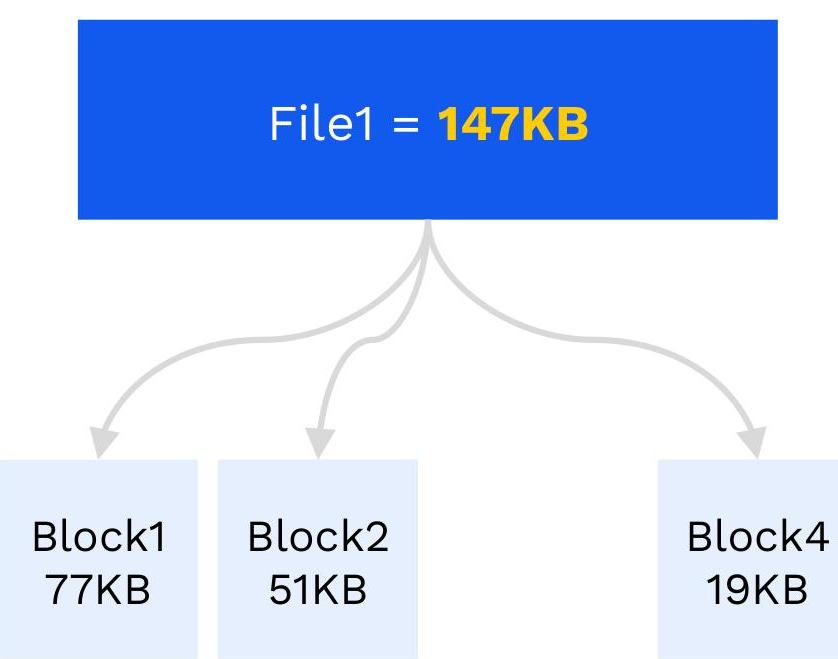
- Only the remaining net-new blocks are committed to the local buffer
- After committing blocks to the local buffer, the user is acknowledged.
- Slow performance of the local buffer is offset after compression and dedup due to the fact that a minimal amount of data is written to it.
- The more compression and more dedup, the faster clients can send data to the Panzura node.
Overview: Node-to-Cloud Data Flow
Node-to-Cloud Data Flow (File):
- A - Dirty Cache
- B - Create Drive File
- C, D - Encrypt Data
- E - Move to Cache
- F - Move to Cloud
- G - Verify Data
Drive Files
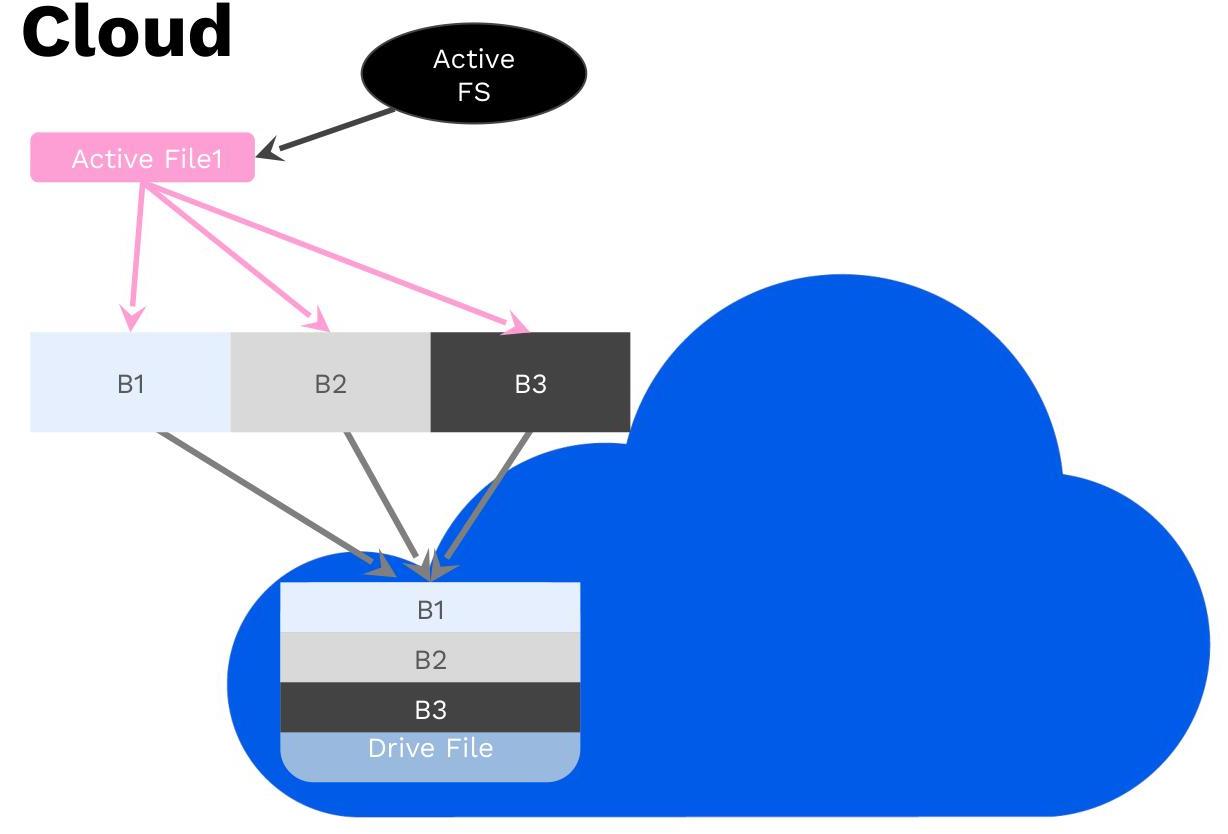
- Drive Files are the containers within the cloud.
- They contain the collection of data blocks that were committed to the buffer:
- They contain unique 128KB data blocks up to a pre-determined size.
- Drive Files can be 1, 2, 4, 8, 16, 32 MB in size.
- For CloudFS NAS and CloudFS Collaboration, the default drive file size is 4 MB.
- For CloudFS Archive, the default drive file size is 32 MB.
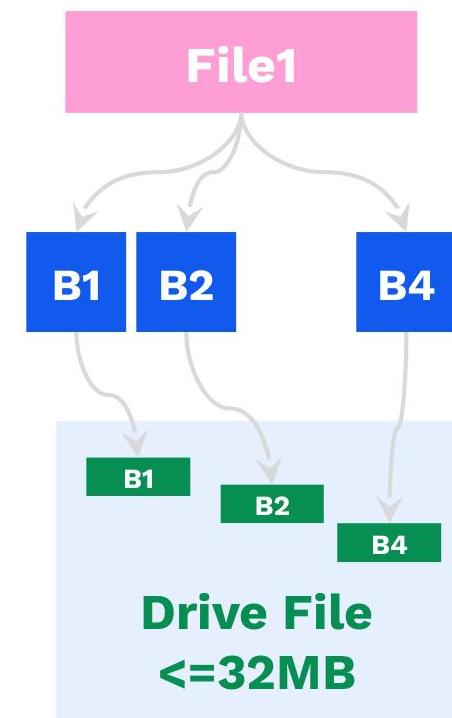
- Drive Files are <=32MB in size.
- Data blocks from the buffer are added to drive files.
- White space at the end of the data blocks is removed.
- The software makes a best effort to keep related data blocks within a single drive file.
- A drive file will contain data blocks from multiple different files.
Creating a Drive File
- Once a drive file is full of data it is encrypted.
- AES-256-CBC.
- Once encrypted the drive file is checksummed.
- Finally the drive file is sent to the cloud and the checksum is verified.
- All data is protected through AES 256 bit encryption for data at rest and TLS 1.2 encryption for data in flight.


Upload to the Cloud
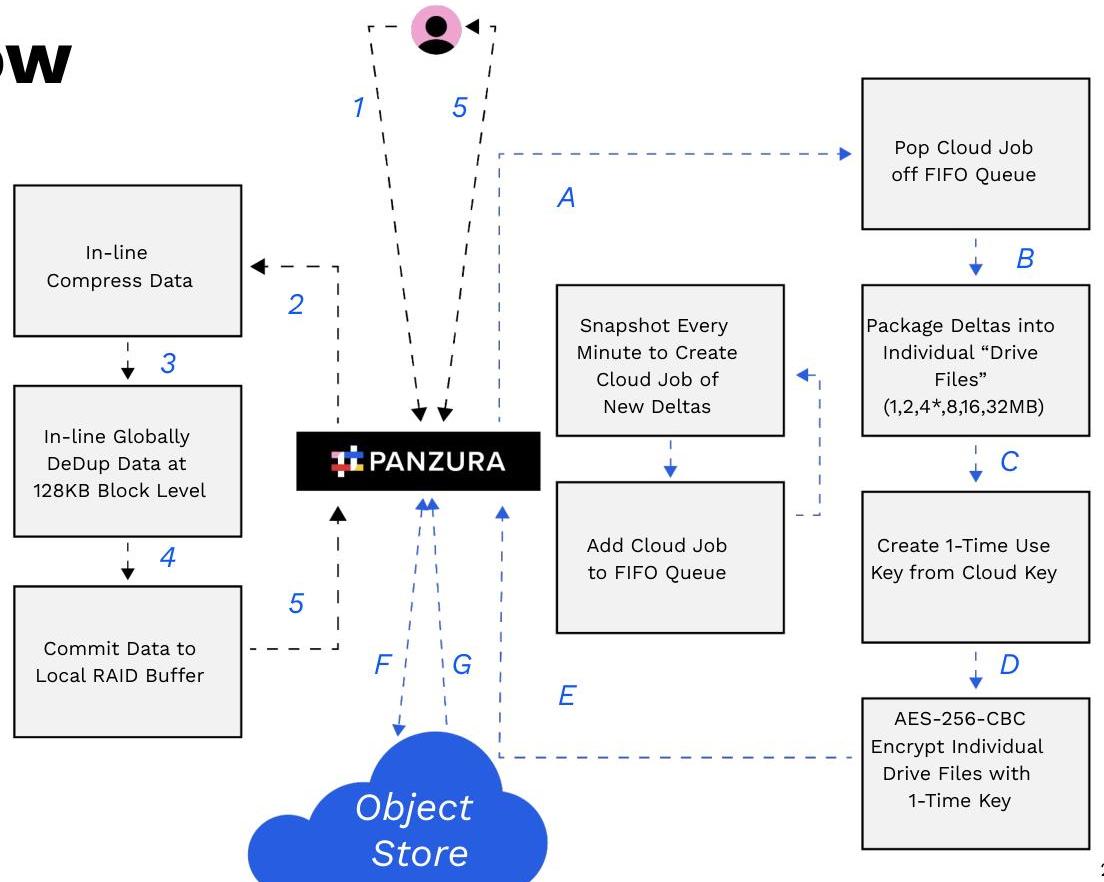
End-to-End Data Flow
User-to-Node Data Flow (File)
- 1 – Write Data
- 2 – Compress
- 3 – Deduplicate
- 4 – Commit to Storage
- 5 – Ack Write
Node-to-Cloud Data Flow (File):
- A – Dirty Cache
- B – Create Drive File
- C, D – Encrypt Data
- E – Dirty Cache move to Cache
- F – Encrypted Drive File Move to Cloud
- G – Verify Data
Knowledge Check
Which of these methods are utilized by the Panzura Nodes for performance optimization? (choose all that apply): A. Splitting file into metadata and data files B. Data compression C. Block Deduplication D. Encrypting and applying checksum to the full doc for upload into the cloud
Knowledge Check
Which of these methods are utilized by the Panzura Nodes for performance optimization? (choose all that apply): A. Splitting file into metadata and data files B. Data compression C. Block Deduplication D. Encrypting and applying checksum to the full doc for upload into the cloud
PANZURA
Questions?
Panzura.com 0000